My digital planner is now open! 2022-2023 Nov-Oct. Download below.
Sunday, 30 October 2022

Wednesday, 26 October 2022
Interactive class with Mentimeter
Mentimeter is an online app that you can use in your classes. As a teacher, you only need a screen to show the word cloud and as a learner, they need smartphones. A teacher creates a question on Mentimeter and shares the question's code with his/her class.

Teacher and learner entrance is different. While teachers create quizzes or questions and open word clouds on Mentimeter.com, learners enter from Menti.com.

When learners write their answers, answers show up on the screen. The most common written answers will be in the middle of the screen and the other answers cover them.

What is a Word Cloud?
Word Clouds (also known as wordle, word collage, or tag cloud) are visual representations of words that give greater prominence to words that appear more frequently. For Mentimeter Word Clouds, the words that are added most frequently by audience members using their smartphones. This type of visualization can help presenters quickly collect data from their audience, highlight the most common answers and present the data in a way that everyone can understand.
Sunday, 13 June 2021
Vidcast
Vidcast is the video version of the Podcast. Just like podcasts, it is constant and on a subject. You can broadcast the vidcast on any platform, including youtube. Like podcasts, vidcasts can be on any topic and can last any time. Some are ongoing film students or independent filmmakers' projects. They can be dramatic, funny, fact-based, or news-related. Some offer video walkthroughs of how to use certain products or how to do something. Using Vidcast, you can learn languages in a very fun way, just like podcasts, for more information read my article about the podcast.
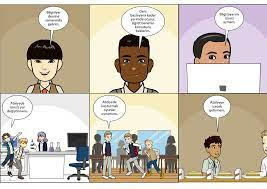
Using Pixton
Pixton is a website that allows teachers and students to create their own comics. There are various comic layouts, countless character and background options, and a host of creative options. It is a tool that allows students to build their own knowledge and demonstrate it in a way that is meaningful to them by allowing it. By using Pixton, you can explain the subject you want to teach to your students in a fun way and make the lesson more efficient.

Using Storybird
Storybird is a website where you can write your own books. You can use your own creativity and write a book however you want. It is a very useful application from an educational point of view. If you sign up as a teacher, you create your first class by specifying your class name and class level. As a teacher, you can create books or follow the progress of your students. Your students sign up with their own accounts and log into the class with their class code.
Mindmeister
Mindmeister is a mind map making application with unlimited content, where you can easily make any mind map you want. Making a mind map is very helpful in explaining and understanding a subject, and thanks to Mindmeister, you can turn any subject into a mind map with your style. Below I am posting some mind map photos I made using Mindmeister.

Language Teaching with Podcast
Podcast is very popular nowadays. Because people are so busy, they can listen to podcasts in the background while they do their work, so it's pretty common and useful. The use of podcasts in language teaching can be done very easily. Today, me and my friend Eslem made a podcast broadcast and talked about how language teaching is carried out using podcasts, what advantages it has. You can reach our podcast from the link below.
https://soundcloud.com/hilal-yi-it-35815873/teaching-language-with-podcast
Subscribe to:
Posts (Atom)
Answer Garden the feedback tool!
Nowadays all over the world is on the verge of change to online education. Boring and classic face-to-face trainings are left behind. Onli...

-
 Using Kahoot, I have an interactive lesson with my students in class. It is very easy to use Kahoot when all students use devices such as c...
 -
 Voki is a free space where you can create a variety of videos. While dealing with the subject of occupations with my students, I created se...
 -
 In this activity, using Jamboard, I present an activity in the textbook to students by transferring it online and making it more interesti...